Table of Contents
Testing homebrew using physical hardware
Required hardware
Game console
To test homebrew, you're going to need at least one WonderSwan hardware unit. There are many options available, between the three official models and various hardware mods; this guide lists them in order from most to least preferred.
- WonderSwan Color - this model of the system supports both mono and color software, while still remaining reasonably affordable (as of writing). There are a few important notes regarding this model:
- The system will not turn on without a cartridge inserted. This leads many sellers to sell otherwise functional units as non-functional for a lower price - if you're adventurous, you could try looking for one in such a condition, but nothing is guaranteed.
- The power button pad has a tendency to wear out, which may give the impression of a non-functional system. This is a fairly inexpensive fix - see the ConsoleMods wiki for more information.
- The display technology is CSTN, as opposed to the GBC/GBA, SwanCrystal, and NGPC's much better TFT panels. This causes noticeable blurriness in use and can be fixed with an IPS mod, though that has its own caveats in the context of homebrew development.
- WonderSwan Color + IPS mod - this setup costs about as much or less than a SwanCrystal while providing the best display quality. The IPS modification kit alone costs about $50 as of writing.
- The IPS mod significantly (~5-6x!) increases battery draw.
- The IPS mod does not correct for the console's color gamut, so you may need to use an emulator separately for validating that colors still look fine on an unmodified system.
- SwanCrystal - this is the best unmodified model of the system, but for this reason it has also become desirable among collectors.
- This guide highly discourages IPS modding SwanCrystals, unless the display itself is damaged and there is no other choice for repair. Unlike the WonderSwan Color, the variable refresh rate trick does not work on currently available IPS kits for the system.
- WonderSwan (mono) - it cannot run WSC-exclusive software, but it is the cheapest of the models.
- Notably, the original Swan's FSTN display has a different gamma compared to the color-capable models, including in compatibility mode! If you don't own this model, you can use an emulator to compare the reproduction of grey shades.
- Pocket Challenge V2 - it's a mono WonderSwan from Benesse!
- Downside: It doesn't actually run WS software, because they expect input buttons to be in different places.
- Upside: That's the only incompatibility, and it's cheap.
In addition, for capturing footage from real hardware, you may be interested in a consolizer mod, which turns an existing WonderSwan Color system into a headless device with HDMI output. The swancolorHD is open source design for DIY builders; RETRO PROTECT sells prebuilt units in Japan under the WSCHD brand.
Flash cartridge
There are a few market options available.
nileswan
The nileswan is a flash cartridge created by 49bitcat, providing 128 megabits (16 megabytes) of ROM space and 512 kilobytes of save RAM. It also includes extensive developer-specific functionality, such as loading software from USB or the ability to use it as a debug serial port.
This cartridge is available for 85 EUR (~$100) new when in stock.
Official programming documentation exists here.
WS Flash Masta
The WS Flash Masta is a flash cartridge created by Flavor, providing fifteen ROM slots of 64 megabits (8 megabytes) each for flashing your own code, as well as 512 kilobytes of save RAM.
This cartridge is available for $120-$130 new when in stock, which is not very often.
Unofficial programming documentation exists here. The USB port cannot be used by user programs.
AliExpress "Youth Edition" cartridge
I have not evaluated this cartridge personally. As such, its hardware specifications are unknown, and I cannot make a clear recommendation or disavowal.
The Youth Edition flash cartridge supports up to eight ROM slots. Little is known about this cartridge - however, it is known to provide fewer than 256 kilobytes of SRAM.
This cartridge is available for ~$75 new when in stock, but it requires the additional purchase of a ~$45 external cartridge reader.
Points deducted for riding off another vendor's brand name while offering an entirely different product. That's not cool.
AliExpress bootleg cartridges
I have not evaluated any of these cartridges personally, however many WonderSwan community members have used these with success. Unfortunately, I cannot point you to any specific sellers. Caveat emptor.
There are a number of cartridges with bootleg copies of licensed games available, some of which may be reflashable using a ~$45 external cartridge reader. They tend to have 64 megabits (8 megabytes) of NOR flash and 256 kilobytes of SRAM.
InsideGadgets cartridge
InsideGadgets sells a compatible flash cartridge. These provide 64 megabits (8 megabytes) for code, and 32 kilobytes of SRAM.
Available for $61 when in stock, though a new customer has to spend an additional $11 for the edge adapter and $33 for the USB flasher device, for a total of $105. If you happen to also be interested in GB/GBC/GBA development, said flasher might be a good longer-term investment.
WonderDog
The WonderDog is a reprogrammable cartridge which was sold in Japan; you may still run into it, especially if you're in that region. It was available in 64 megabit (8MB), 32 megabit (4MB) and 4 megabit (512KB) variants.
Second-hand/legacy options
These options are no longer available for sale, but are nonetheless listed in case you run into them:
- RetroOnyx's Wonderswan eInk Flash Cart - it has been in a state of “collecting interest” for years; to my knowledge, there are no plans for any release at this time.
- WonderMagic Color - the only unofficial flash cartridge for the system contemporary to its lifespan; very dated by today's standards. Typically seen in a 32 megabit (4MB) variant. In case you run into one, a copy of the PC flashing software is archived here.
Optional hardware
RS-232 cable
A serial port adapter allows the user to communicate with the console using a PC. Unless you're working with the WonderWitch OS, this is not necessary. However, it can make debugging and data transfer more convenient.
An official cable was bundled with the WonderWitch; however, a list of available DIY projects and products is available on the ConsoleMods wiki.
Of those, I have personally developed the ExtFriend; unlike the official cable, in addition to supporting 9600/38400 baud UART transfer, it also supports the undocumented 192000 baud speed and headphone audio capture.
WonderWitch
Testing WonderWitch games can be achieved on emulators and real hardware alike by flashing an mkrom image to any cartridge with at least 2561) kilobytes of SRAM.
However, for verifying full compatibility, a real WonderWitch environment is optimal. To do so without resorting to copyright infringement, it is currently required to purchase a second-hand WonderWitch.
The full WonderWitch box set consists of a few key elements:
- the WonderWitch flash cartridge. This is absolutely required.
- the RS-232 adapter cable. This is required, but there is nothing special about the one packaged with the cartridge; you can build your own or buy a replacement.
- the development CD-ROM. This is not required if you intend on only developing using Wonderful.
- the printed development manual. This is not required, as a digital copy of the manual is provided on the CD-ROM.
Note that the WonderWitch was sold in a few variants, but all of them feature the same flash cartridge:
- The WonderWitch itself had a few production runs, of which only the later ones came with official color development libraries and samples pre-bundled. These are, of course, not required for developing using Wonderful.
- The WonderWitch Player is a variant of the cartridge without official development tools on the CD-ROM.
- There were also cartridge-only packages sold, intended for owners of a WonderWitch kit who needed more program space or wanted to share cartridges with friends.
As the box set is highly desirable among collectors - usually selling for 50,000 yen or more - one may wish to consider buying a loose cartridge and acquiring an RS-232 cable separately.
Updating FreyaOS
Once you acquire a cartridge, you should update FreyaOS. Older versions of the system featured a variety of bugs, including file system management bugs.
If you own a licensed WonderWitch cartridge, you may download the FreyaOS 1.2.0 update package on Qute's WonderWitch Player website. While the site is intended for WonderWitch Player owners only, this file also was available for registered WonderWitch owners via an FTP server; however, that server is no longer online. The licensing situation of flashing a FreyaOS update on a loose cartridge without ownership a full box is left as an exercise to the reader; I'm not a lawyer.
To install it without TransMagic, turn on the WonderSwan with a WonderWitch cartridge inserted while holding B. If done correctly, you should enter Freya Monitor instead of the default user interface:
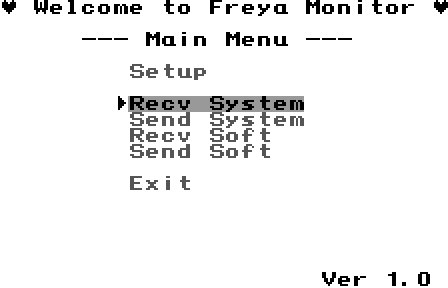
From here, connect the RS-232 cable, prepare an XMODEM transfer of the FreyaOS update package file from the PC to the console, and select Recv System on the console side.